Harvard Business School - Executive Education - 100 Years: 1908-2008


Planning for Your Stay

> ACCOMMODATIONS

All Harvard Business School Executive Education programs are residential programs, and participants are expected to live on campus. The intense peer contact that forms the basis for much of the learning experience is perhaps the most unique feature of our programs. It is therefore not advisable to relocate family members to the Boston area during your program.

Bedrooms are single-occupancy only and will be available to you on your registration day. Unfortunately, we are unable to offer accommodations on campus either before your program begins or after it concludes. If you do plan to arrive in Boston prior to or stay after your program, please contact your program staff for information on area hotels that are convenient to HBS.

• Residence Halls
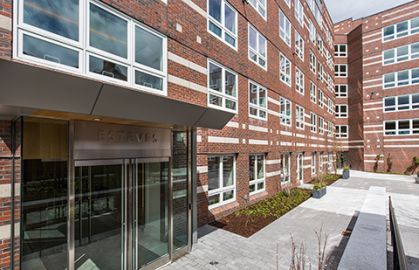
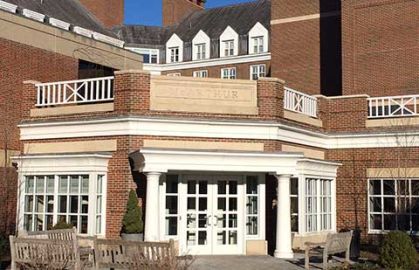
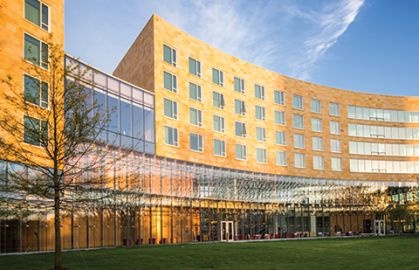
HBS Executive Education residence halls are designed to foster out-of-class discussion and shared learning. Individual bedrooms are clustered near a common conference/lounge area. Each conference/lounge area has a large LCD projection monitor with laptop hookup, DVD/VCR player, computer, shared printer and cable TV. In addition, among other amenities, there is a coffee/tea maker and a refrigerator stocked with water, juice and soda.

For more detailed information on the three HBS Executive Education residence halls, please see the building guides.

• Living/Project Group
Prior to your arrival, the composition of each living/project group is determined in order to achieve maximum diversity and optimize your learning experience. Industry, geographic origin and functional background are all taken into consideration.

• Bedrooms
Each bedroom has a private bathroom (with towels, soap, shampoo and conditioner) and is equipped with a single bed (including linens and pillows), desk, safe, alarm clock/radio, iron, ironing board and hairdryer. Our housekeeping staff provides daily service except on Sundays. There is also a desktop computer (see Technology) and a telephone (see Telephones) in each bedroom. Other than a hairdryer and iron, if desired you should bring your own electrical personal care appliances and adapters that accommodate 120 volts.

• Building Guides
Baker Hall
McArthur Hall
Mellon Hall

[ top ]

> ARRIVAL AND DIRECTIONS

Harvard Business School is located in Boston, directly opposite Harvard Stadium and across the Charles River from the Harvard University campus and Harvard Square (about a 15-minute walk). Vehicles are permitted to drive onto the HBS campus only on program registration and departure days for the safety of our community (ours is a walking campus with no sidewalks).

From Logan Airport, HBS is easily reached by taxi. Taxis (and car rental shuttles) operate from the lower level curbs near the baggage claim area of your terminal at Logan. To arrange ground transportation prior to your arrival at Logan, you may wish to contact an area limousine service, such as Commonwealth Limo at 1-800-558-5466 or Town Car International at 1-888-482-4685.

Please be sure to have your driver enter campus through the Soldiers Field Park/One Western Avenue East Drive entrance. This entrance is accessible off of Western Avenue and is adjacent to the parking garage. Instruct your driver to proceed straight ahead to the guard booth and tell the guard which program you are checking in for and in which residence hall. Your vehicle will then be allowed onto campus. This also applies if you are driving yourself to campus. See this campus map for a visual layout.

During scheduled registration hours, porters will meet you to assist with your luggage. If your travel plans necessitate arriving after the scheduled registration hours, please be sure to notify someone on your program team so that they can make alternate registration arrangements for you.

Directions to HBS from Logan Airport: Upon departing the airport, follow signs for I-90 West (Massachusetts Turnpike/Ted Williams Tunnel). Take I-90 West to exit 20 for Brighton/Cambridge. Bear right towards Cambridge. Continue through the first set of lights and immediately get in the left lane. Turn left onto Soldiers Field Road just past the second set of lights and before the bridge. Turn left onto Western Avenue at the first stoplight. Enter campus through the Soldiers Field Park/One Western Avenue East Drive entrance next to the parking garage (about 0.2 miles down on your right). See this campus map for a visual layout.

[ top ]

> AUTOMOBILES

While it is not necessary to have a car while you are at HBS, if you choose to bring one, you may park it on campus in the parking garage. After you drive onto campus and arrive at your residence hall to register (see Arrival and Directions), please inform the staff that you will need a parking pass for your vehicle. Once you have dropped off your belongings in your room, you are asked to return to your vehicle and move it into the garage.

[ top ]

> BAGGAGE SHIPMENTS

Baggage may be sent prior to your arrival. It should be addressed to:

[Your name]
[Your program name]
[Your residence hall]*
Harvard Business School
25 Harvard Way
Boston, MA 02163

*if known

Please note: Shipments from outside the U.S. must be cleared through Customs by the recipient before they can be released. We recommend bringing all personal effects with you rather than shipping them separately. This will eliminate returning to the airport after arrival for Customs inspection. Past participants have found that paying for excess baggage is no more expensive than separate air freight shipment.

[ top ]

> BANKING

If you need banking services while at HBS, the most convenient banks are Bank of America and Citizens Bank:

Bank of America
1414 Massachusetts Avenue (Harvard Square)
Cambridge, MA 02138
Tel: 1-800-432-1000
(Bank of America has an Automated Teller Machine (ATM) located in Spangler Center on the HBS campus.)

Citizens Bank
6 JFK Street (Harvard Square)
Cambridge, MA 02138
Tel: 617-868-4900

Cash may be obtained by using your credit card or debit card at the ATMs on campus.

[ top ]

> BOSTON CLIMATE

The average (low / high) temperatures in Boston, by month:

  January 22° / 36° Fahrenheit (-6° / 2° Celsius)
  February 24° / 39° Fahrenheit (-4° / 4° Celsius)
  March 31° / 46° Fahrenheit (-1° / 8° Celsius)
  April 41° / 56° Fahrenheit (5° / 13° Celsius)
  May 50° / 67° Fahrenheit (10° / 19° Celsius)
  June 59° / 77° Fahrenheit (15° / 25° Celsius)
  July 65° / 82° Fahrenheit (18° / 28° Celsius)
  August 64° / 80° Fahrenheit (18° / 27° Celsius)
  September 57° / 73° Fahrenheit (14° / 23° Celsius)
  October 46° / 62° Fahrenheit (8° / 17° Celsius)
  November 38° / 52° Fahrenheit (3° / 11° Celsius)
  December 28° / 42° Fahrenheit (-2° / 6° Celsius)

[ top ]

> COURSE PREPARATION

The preliminary readings will be posted to your program website a few weeks before the start of the program. When the program website is available, you will receive an email from the program staff with instructions on how to access the site. Most of the materials for the rest of the program will be in your room when you arrive.

[ top ]

> MISCELLANEOUS EXPENSES

Miscellaneous expenses not covered by the program fee include (but are not limited to): long-distance/international telephone calls, dry cleaning and shipping materials home at the end of the program.

If you are enrolled in a program lasting seven days or longer, you should also factor in Saturday and Sunday night dinners, which are not provided as part of the program.

[ top ]

> REGISTRATION

Registration takes place at your residence hall program office on the opening day of your program. If your travel plans necessitate late arrival, please be sure to notify us so that we can make alternate registration arrangements for you.

[ top ]

> TECHNOLOGY

Every bedroom has a desktop computer with high-speed Internet access running Microsoft Windows XP. Software includes Firefox and Internet Explorer, as well as Microsoft Office 2007 including Excel, Word and PowerPoint. Each bedroom also has an Ethernet cable for a laptop and all HBS buildings have wireless Internet throughout. A shared printer is located in each living/project group. Technical support will be available as required. For more information, please see the Executive Education Technology Services page.

[ top ]